
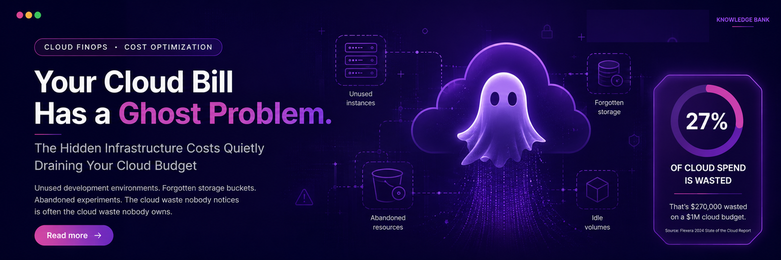
Global cloud spending hit $723 billion in 2025.
Roughly 27% of it was wasted. Not stolen. Not misused. Just… left running.
For a company spending $1 million a year on cloud, that’s $270,000 going absolutely nowhere.
A dev server nobody remembered to shut down after a sprint. A storage bucket full of test files from two years ago. A feature experiment that got spun up, tested once, and quietly forgotten. None of this is exotic. It’s the everyday reality of almost every engineering org on the planet, including, probably, yours.
84% of organisations say managing cloud spend is their top challenge right now. The frustrating part? The tools and techniques to fix this are well understood. What’s usually missing is a framework, shared ownership between engineering and finance, and the discipline to actually follow through.
Here’s that framework.
Cloud cost isn’t a finance problem. It’s an engineering one.
FinOps — Financial Operations — isn’t a tool or a dashboard. It’s a cultural practice that brings engineering, finance, and the business together around one goal: getting maximum value from every dollar spent on infrastructure.
Three principles drive it:
Everyone owns their cloud spend — not just finance. Decisions get made on real-time data, not quarterly guesswork. The goal is maximising value, not minimising cost — those aren’t the same thing.
When engineers can see what their service actually costs in real time, they make better decisions naturally. Nobody needs to police them. They just need visibility.
Most organisations are stuck at “Crawl”
FinOps maturity moves through three stages — and where you sit determines how much money is currently walking out the door.
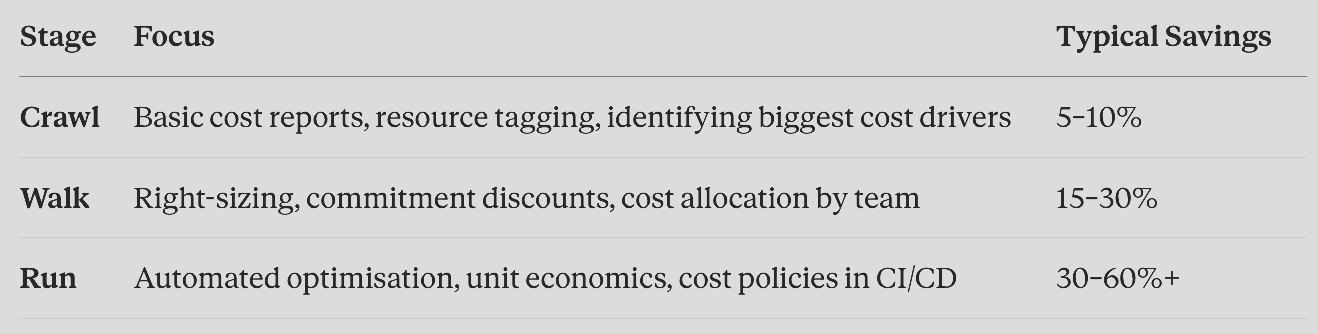
Only 14.2% of organisations have reached “Run.” Most are still stuck at Crawl or Walk: which means most organisations are sitting on enormous unrealized savings without knowing it.
You can’t fix what you can’t see
If your cloud bill jumps $20,000 in a month and you have no resource tagging in place, you genuinely have no idea why. Was it the payments team? A staging environment someone forgot? An accidental resource has been left running since March?
With tagging, you trace it in minutes. Without it, you’re guessing.
A good tagging strategy answers 4 questions: who owns this (team-platform, team-payments), what environment is this (production, staging, dev), which budget does this belong to (cost-centre), and what product is this for (application).
The rule that actually matters: enforce tagging automatically. Every cloud provider lets you reject resource creation if required tags are missing. Make untagged resources impossible to create — not just discouraged. Discouragement doesn’t survive a Friday afternoon deadline.
The three places where money quietly disappears
1. Compute what you’ve outgrown — or never needed. Boston Consulting Group estimates up to 30% of cloud spend goes to over-provisioned or idle resources. A backend service running on 8 CPU cores because “that felt safe” while actually using 1 core under normal load isn’t an edge case — it’s the default. Size for your 95th percentile usage, add a 20–30% buffer, and stop paying for “just in case” scenarios that rarely happen.
2. Predictable workloads paying unpredictable prices. If you’re running stable, predictable compute on demand, you’re paying full rack rate every single day. Commitment-based discounts — Savings Plans, Reserved Instances—can cut that by up to 75%. Cover 70–80% of your stable baseline this way. Leave the rest flexible for spikes.
3. Kubernetes clusters that are 90% empty. This one’s almost unbelievable until you see your own numbers. The Cast AI 2025 Kubernetes Cost Benchmark found that 99.94% of Kubernetes clusters are over-provisioned — average CPU utilisation sits at just 10%. That means the average organisation running Kubernetes is paying for roughly 10x more capacity than it uses.
Why does this happen? Developers declare resource requests conservatively because nobody wants their service to crash in production. Multiply that caution across hundreds of services, and you get a cluster paying for capacity that simply doesn’t exist in practice.
The fix nobody wants to hear: turn things off
Development and test environments don’t need to run at 2am on a Saturday. A dev server running overnight and on weekends provides exactly zero value — and costs the same as one running during business hours.
Scheduling automatic shutdowns outside working hours typically saves 50–70% on those resources, with zero impact on any real user. It’s one of the simplest, fastest wins available — and it’s usually overlooked simply because nobody specifically owns the job of turning things off.
Catch the cost before it ships, not after the invoice
By the time a cost problem shows up on your bill, it’s already been running for weeks.
Tools like Infracost integrate directly into your infrastructure-as-code review process. Before a pull request merges, the reviewer sees: “This change adds approximately $500/month to your cloud bill.” That’s a fundamentally different conversation than discovering the same number on next month’s invoice, after the damage is already done.
This is the entire philosophy in one sentence: shift cost awareness to the point where the decision is actually being made.
What 90 days of doing this properly look like
This sequencing consistently delivers 25–40% cost reduction within 90 days, with zero impact on performance or reliability:
Month 1 — Visibility & quick wins: Enable native cost reporting. Enforce mandatory tagging. Delete anything idle for 30+ days. Schedule shutdowns for non-prod environments.
Month 2 — Structural fixes: Right-size your 10 most expensive workloads. Buy commitment discounts to cover 60–70% of stable compute. Set up storage lifecycle policies. Deploy namespace-level Kubernetes cost visibility.
Month 3 — Governance that sticks: Add cost estimation to your code review process. Establish weekly per-team cost reviews. Measure baseline versus current spend and report the savings to leadership.
The real lesson
None of this requires sophisticated tooling. Most of the tools mentioned here are free: Amazon Web Services (AWS) Cost Explorer, Microsoft Azure Advisor, Google Cloud Recommender, OpenCost, and Karpenter. The technology was never the bottleneck.
The bottleneck is ownership. An engineer who can see that the service they shipped last month costs $3,000/month and eats 15% of their team’s budget thinks differently about the next feature they build. An engineer who never sees that number has no reason to think about it at all.
Cloud cost optimisation isn’t a one-time project you complete and move on from. It’s a discipline — the same way code review or testing is a discipline. The organisations that treat it as a first-class engineering concern consistently save 30–60%. The ones that treat it as an annual finance exercise consistently don’t.
The frameworks are proven. The tools are mostly free. The only variable left is whether your organisation actually does it.
What’s the cloud cost surprise that taught your team a lesson the hard way?
The forgotten dev server. The cluster nobody right-sized. The storage bucket from 2022 is still racking up charges. Drop it below — these stories are always more relatable than any framework. 👇
If this gave your engineering team language for a conversation finance keeps trying to have with you, share it. The fastest way to fix a $270K problem is to make sure the right people see it.
#CloudComputing #FinOps #AWS #Azure #GCP #Kubernetes #DevOps #CloudCostOptimization #CTO #TechLeadership #SoftwareEngineering #CloudArchitecture #Engineering #DigitalTransformation #CostOptimization #PlatformEngineering #StartupLife #TechStrategy